> ## Documentation Index
> Fetch the complete documentation index at: https://docs.soharhealth.com/llms.txt
> Use this file to discover all available pages before exploring further.
# Data Analytics
This guide shows you how to build a pipeline that ingests webhook-triggered Verification data from Sohar into your data warehouse. This pattern is ideal for:
* Performing analytics or business intelligence on structured API data
* Creating structured data exports to import into external tools
* Decoupling real-time webhook handling from downstream ETL
* Scaling data pipelines efficiently
## Setup
Create a client ID and client secret in the Sohar [dashboard](https://app.soharhealth.com/settings#oauth).
Configure a [webhook endpoint](/documentation/webhooks/introduction) to listen for events. Subscribe your endpoint to the `verification.updated` event.
Configure an Amazon S3 bucket with programmatic write permissions via IAM user or role.
In this guide we reference Amazon S3, but the same process also applies to Google Cloud Storage and similar services.
## Workflow
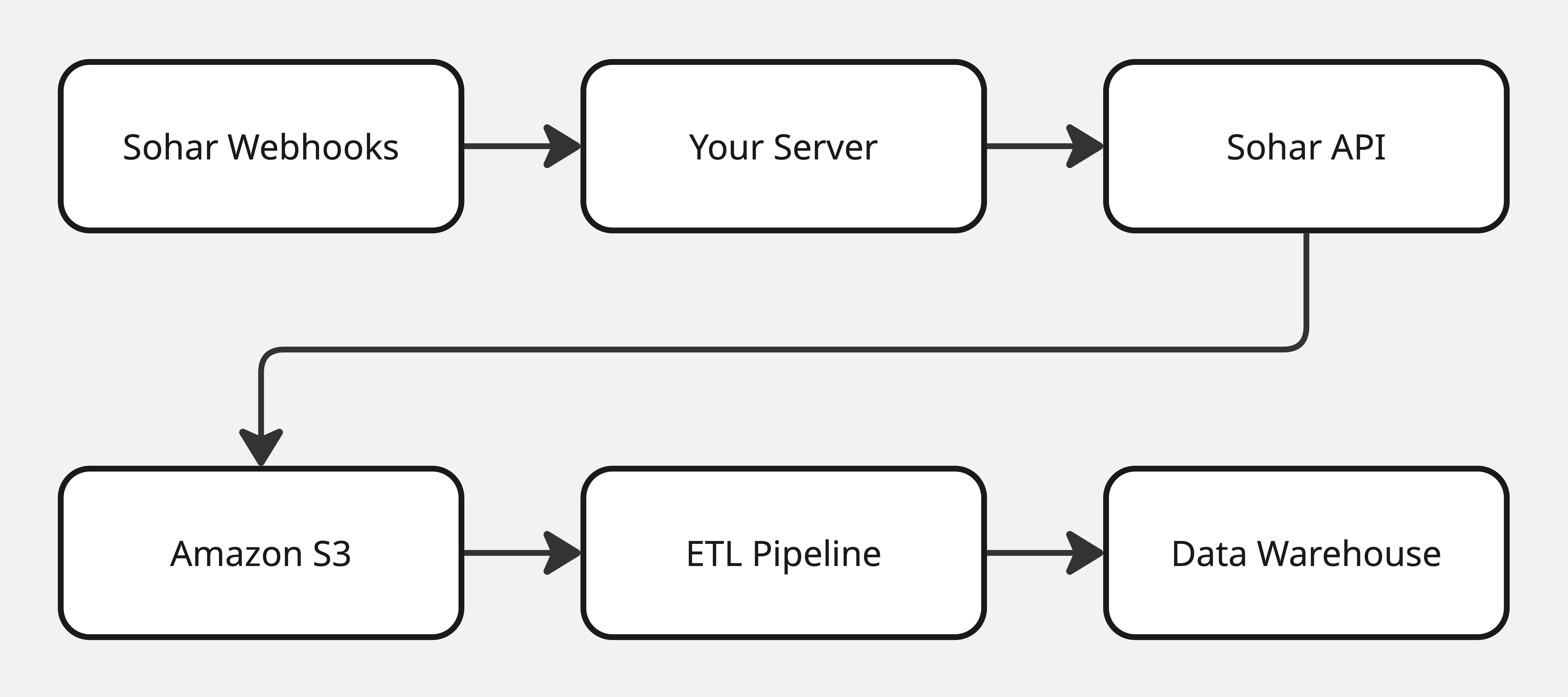
The diagram below outlines the workflow we will build to transfer Verification data from Sohar to your data warehouse.
 ## Handle Webhook Events
Here's a basic Express route to receive webhook events from Sohar and save the Verification response to Amazon S3:
```js theme={null}
const express = require('express');
const axios = require('axios');
const AWS = require('aws-sdk');
const app = express();
app.use(express.json());
// Configure AWS SDK
AWS.config.update({ region: process.env.AWS_REGION });
const s3 = new AWS.S3();
const BUCKET = process.env.S3_BUCKET_NAME;
app.post('/webhooks', async (req, res) => {
// Retrieve the verification ID from the request body
const verificationId = req.body['verificationId'];
// Generate an access token
const createTokenResponse = await axios.post(
'https://api.soharhealth.com/oauth/token',
{
client_id: process.env.SOHAR_CLIENT_ID,
client_secret: process.env.SOHAR_CLIENT_SECRET
}
);
const accessToken = createTokenResponse.data.access_token;
// Retrieve details of the completed verification
const getVerificationResponse = await axios.get(
`https://api.soharhealth.com/v2/verifications/${verificationId}`,
{
headers: {
'Authorization': `Bearer ${accessToken}`
}
}
);
const verificationData = getVerificationResponse.data;
// Save to Amazon S3
const timestamp = new Date().toISOString();
const folder = timestamp.split('T')[0].replace(/-/g, '/'); // "2025/06/01"
const key = `sohar-data/${folder}/${verificationId}.json`;
await s3.putObject({
Bucket: BUCKET,
Key: key,
Body: JSON.stringify(verificationData),
ContentType: 'application/json',
}).promise();
console.log(`Saved JSON to S3: ${key}`);
res.status(200).send({ success: true });
});
app.listen(3000, () => console.log(`Listening on port 3000`));
```
## Load to the Data Warehouse
Now that data is in S3, you can:
* Use **AWS Glue** to crawl and ETL the data into Redshift or Athena
* Use **dbt + dbt-s3** to ELT from S3 into Snowflake or BigQuery
* Use **Airbyte**, **Fivetran**, or **custom scripts** for downstream ingestion
## Handle Webhook Events
Here's a basic Express route to receive webhook events from Sohar and save the Verification response to Amazon S3:
```js theme={null}
const express = require('express');
const axios = require('axios');
const AWS = require('aws-sdk');
const app = express();
app.use(express.json());
// Configure AWS SDK
AWS.config.update({ region: process.env.AWS_REGION });
const s3 = new AWS.S3();
const BUCKET = process.env.S3_BUCKET_NAME;
app.post('/webhooks', async (req, res) => {
// Retrieve the verification ID from the request body
const verificationId = req.body['verificationId'];
// Generate an access token
const createTokenResponse = await axios.post(
'https://api.soharhealth.com/oauth/token',
{
client_id: process.env.SOHAR_CLIENT_ID,
client_secret: process.env.SOHAR_CLIENT_SECRET
}
);
const accessToken = createTokenResponse.data.access_token;
// Retrieve details of the completed verification
const getVerificationResponse = await axios.get(
`https://api.soharhealth.com/v2/verifications/${verificationId}`,
{
headers: {
'Authorization': `Bearer ${accessToken}`
}
}
);
const verificationData = getVerificationResponse.data;
// Save to Amazon S3
const timestamp = new Date().toISOString();
const folder = timestamp.split('T')[0].replace(/-/g, '/'); // "2025/06/01"
const key = `sohar-data/${folder}/${verificationId}.json`;
await s3.putObject({
Bucket: BUCKET,
Key: key,
Body: JSON.stringify(verificationData),
ContentType: 'application/json',
}).promise();
console.log(`Saved JSON to S3: ${key}`);
res.status(200).send({ success: true });
});
app.listen(3000, () => console.log(`Listening on port 3000`));
```
## Load to the Data Warehouse
Now that data is in S3, you can:
* Use **AWS Glue** to crawl and ETL the data into Redshift or Athena
* Use **dbt + dbt-s3** to ELT from S3 into Snowflake or BigQuery
* Use **Airbyte**, **Fivetran**, or **custom scripts** for downstream ingestion